
• 0 Sepet
  • Hesap
    • Giriş
    • Kayıt
    • Şifremi Unuttum?
  • Ana Sayfa
  • Ürünler
    • Tümünü Görüntüle
    • Paylaşımlı hosting
    • DMCA Ignored Hosting
    • WordPress Hosting
    • Wiki Hosting
    • Linux VPS
    • Windows VPS
    • Dedicated Servers
    • Legacy Servers
    • Email Hosting
    • Scripts & Software
    • Yeni Alan Adı Kaydet
    • Alan Adı Transfer
  • Duyurular
  • Bilgi Bankası
  • Sunucu/Ağ Durumu
  • Satış Ortaklığı
  • İletişim
  • Daha Fazla

Bilgi Bankası

  1. Ana Sayfa
  2. Bilgi Bankası
  3. cPanel - Control Panel
  4. How to Change the Language of Your cPanel Account

  Kategoriler

Backup/Restore
4
Cloudflare (cPanel)
9
CloudLinux (cPanel)
10
Control Panels
3
cPanel - Control Panel
24
Databases
11
Dedicated Servers
0
DirectAdmin
48
DNS - Nameservers
6
Domain Management
10
Email
17
FTP
9
General Topics
1
Installing a Control Panel
6
Mail Filters & SPAM
8
Mobile
11
Others
3
PayPal
7
Plesk
47
Security
10
Shared Hosting
0
SiteWorx (Control Panel)
58
Softaculous
69
SolusVM
18
SSL
5
Virtual Servers
0
Virtualizor
19
VPN
0
WHM
18
WordPress
17

  Kategoriler

  Destek

Destek Bildirimlerim
Duyurular
Bilgi Bankası
Dosyalar
Sunucu/Ağ Durumu
Yeni Destek Bildirimi

How to Change the Language of Your cPanel Account Yazdır

  • 97

cPanel supports many languages. If you want to change your cPanel language to a native one, you should follow this tutorial.


1. Log in to your cPanel account.


2. In the Preferences section, click on Change Language.


3. Select the appropriate language from the drop-down menu and click on Change.
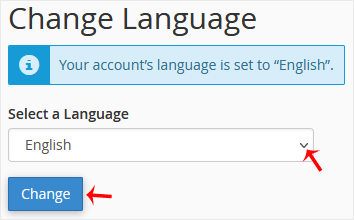

The language in your cPanel has been successfully changed.


Bu cevap yeterince yardımcı oldu mu?

İlgili diğer dökümanlar

How to Reset cPanel's Account Password If you have access to your cPanel account, follow these steps to reset your password:1. Log in to... How to Change cPanel's Style/Theme Switching over to another cPanel theme with a different style is easy.1. Log in to your cPanel... How to Upload Files via the cPanel File Manager You can use cPanel's inbuilt file manager instead of an FTP program. 1. Log in to your cPanel... How to Edit (Dot)htaccess File in the cPanel File Manager 1. Log in to your cPanel account. 2. In the Files section, click on File Manager.  3. Navigate... How to Check the Disk Usage and the Bandwidth Usage of Directories If you are getting a disk space usage warning from cPanel and don't know which directory is using...
<< Geri

  Destek

Destek Bildirimlerim
Duyurular
Bilgi Bankası
Dosyalar
Sunucu/Ağ Durumu
Yeni Destek Bildirimi

Quia voluptas sit asper aut oit aut fugit sed quia consequuntur magni nesciunt ese ciu aorro…

Navigation

  • Home
  • About
  • Support
  • Domain
  • Contact

Useful Links

  • Shared Hosting
  • Dedicated Hosting
  • Reseller Hosting
  • VPS Hosting
  • Blogs

Contact Us

  • +61 3 8376 6284
  • [email protected]
  • 21 King Street Melbourne, 3000, Australia

  • İletişim

Telif hakkı © 2026 Entexion - Web Hosting, VPS and Dedicated Servers. Tüm Hakları Saklıdır.


Yükleniyor...
Yükleniyor...
Dil seçin
العربية
Azerbaijani
Català
中文
Hrvatski
Čeština
Dansk
Nederlands
English
Estonian
Persian
Français
Deutsch
עברית
Magyar
Italiano
Macedonian
Norwegian
Português
Português
Română
Русский
Español
Svenska
Türkçe
Українська

Para Birimi

$ USD
EUR
GBP
CNY
฿ THB
₹ INR

Şifre Oluştur

Lütfen şifre uzunluğu için 8 ile 64 arasında bir sayı girin